
Table of Contents
- On your computer, open Chrome.
- At the top right, click More
New Incognito Window.
- A new window appears. In the top corner, check for the Incognito icon
.
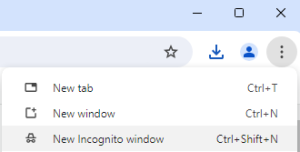

You can also use a keyboard shortcut to open an Incognito window:
- Windows, Linux, or Chrome OS: Press Ctrl + Shift + n.
- Mac: Press ⌘ + Shift + n.
You can switch between Incognito windows and regular Chrome windows. You’ll only browse in private when you’re using an Incognito window.
Close Incognito mode #
If you have an Incognito window open and you open another one, your private browsing session will continue in the new window. To exit Incognito mode, close all Incognito windows.
If you find a number next to the Incognito icon at the top right, you have more than one Incognito window open. To close an Incognito window:
- On your computer, go to your Incognito window.
- Close the window:
- Windows or Chrome OS: At the top right, click Close
.
- Mac: At the top left, click Close
- Windows or Chrome OS: At the top right, click Close


